Your MacBook lost 40% overnight. Find out exactly why.
macOS keeps a detailed log of every sleep, wake, and battery-draining app — it just never shows you. Drainspotting reads it and explains, in plain English, what drained your battery, what blocked sleep, and what woke your Mac at 3 AM.
macOS 14+ · 14-day full trial · no subscription · nothing leaves your Mac
The 3 AM battery mystery, solved
Apple's Battery settings show you a bar chart and a shrug. But under the hood, powerd records everything: every app that held your Mac awake (with durations), every wake and exactly what caused it, your battery percentage the whole way through.
Drainspotting turns that 62,000-line log into answers.
"I wish there was a tool which let me go back through recent history, even just since the last 100% charge, and tell me why my machine was not sleeping or idling and what was consuming power. Apple has added some energy tools over the years but has never offered tools to explain system behaviour."
Autopsy
Every battery session, dissected
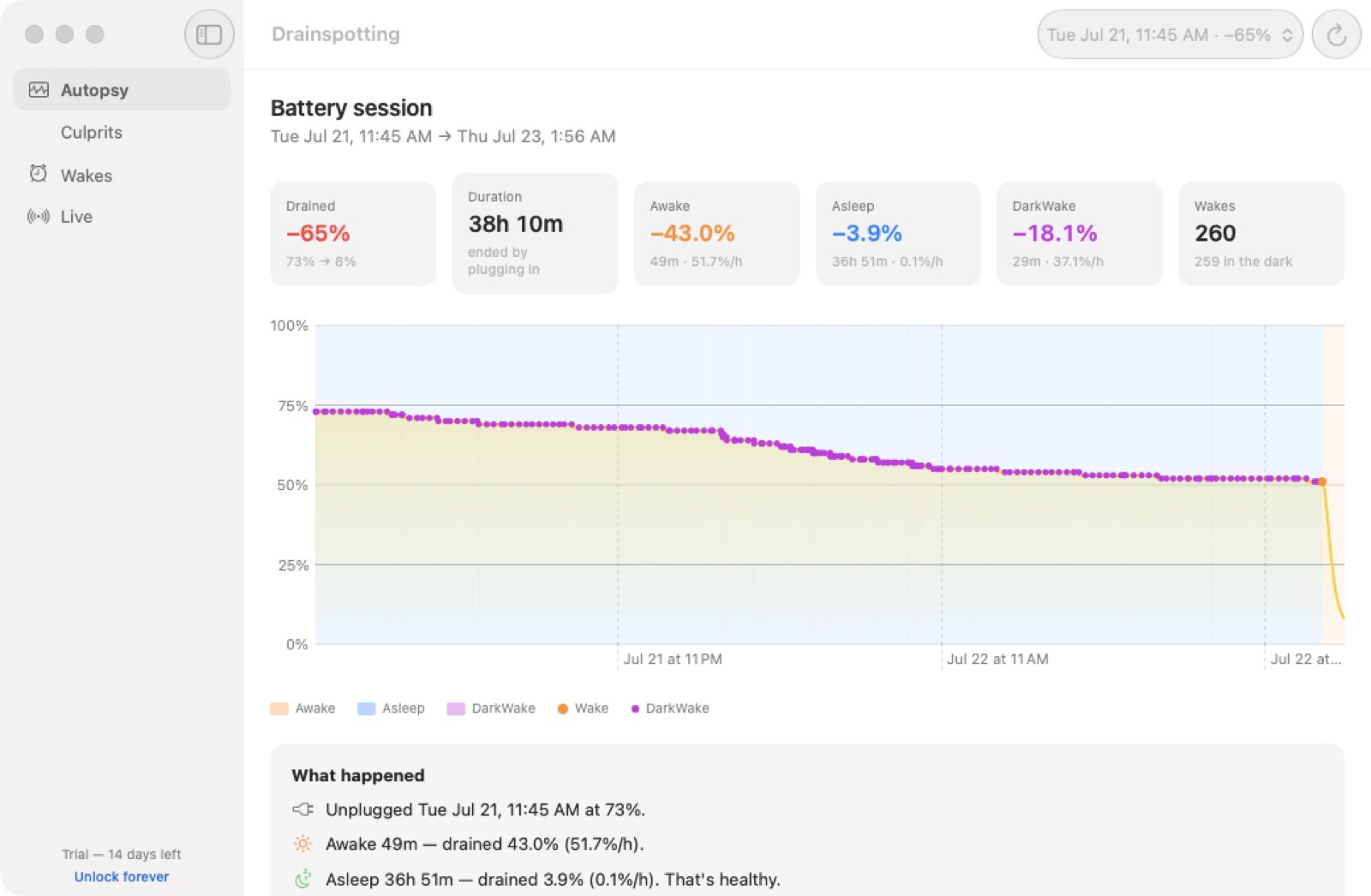
Pick any recent unplugged stretch and see the full story: the charge curve, when the Mac was awake, asleep, or dark-waking behind your back — and the drain rate for each state.
Awake 49m −43.0% (51.7%/h)
Asleep 36h 51m −3.9% (0.1%/h)
DarkWake 29m −18.1% (37.1%/h)
Wakes 260 — 259 in the dark
Culprits
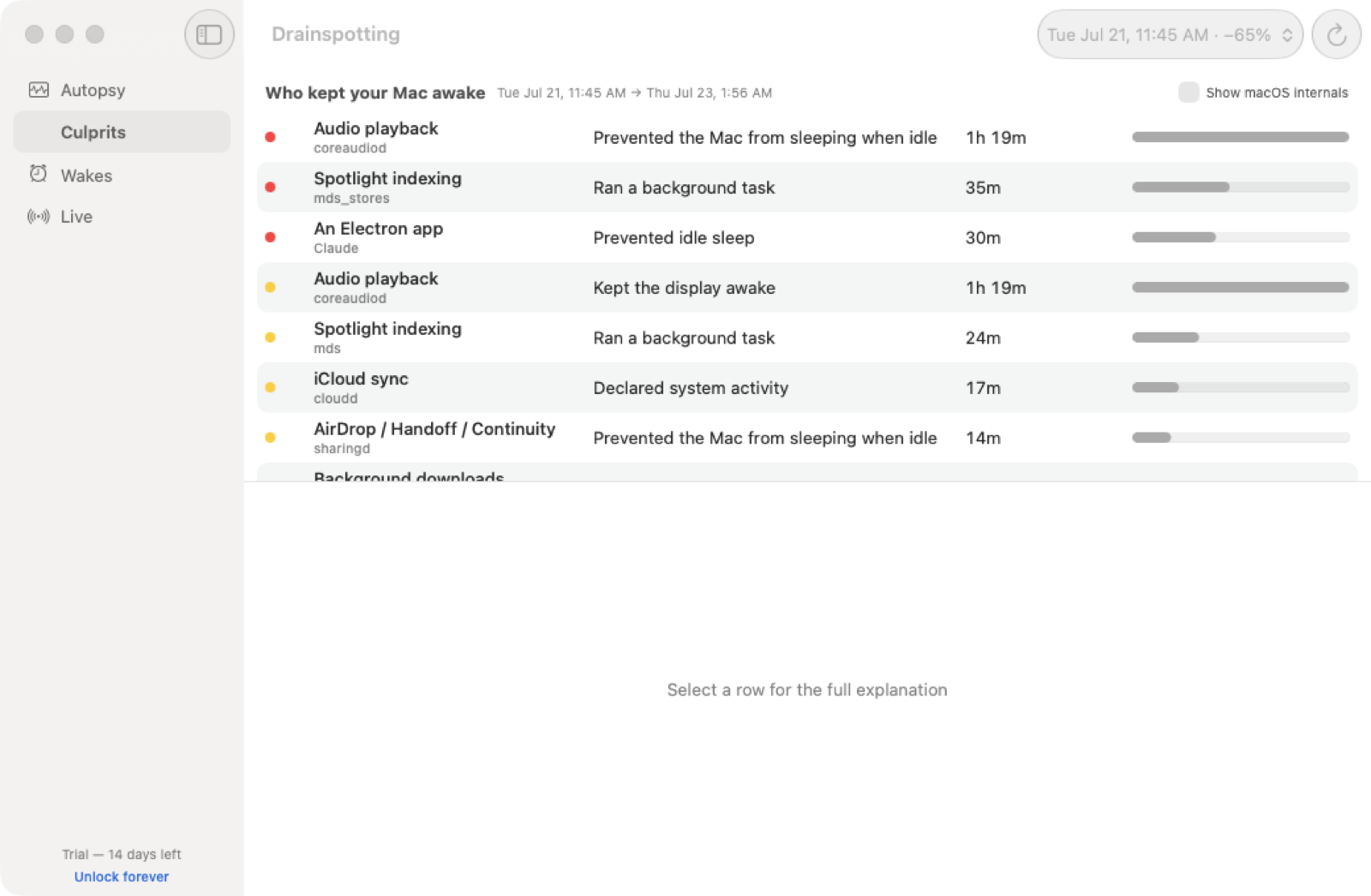
Name the app that kept it awake
A ranked lineup of every process that held a power assertion — how long it actually overlapped your Mac being awake, what it means, and how to fix it. Even Electron apps hiding behind generic assertions get identified.
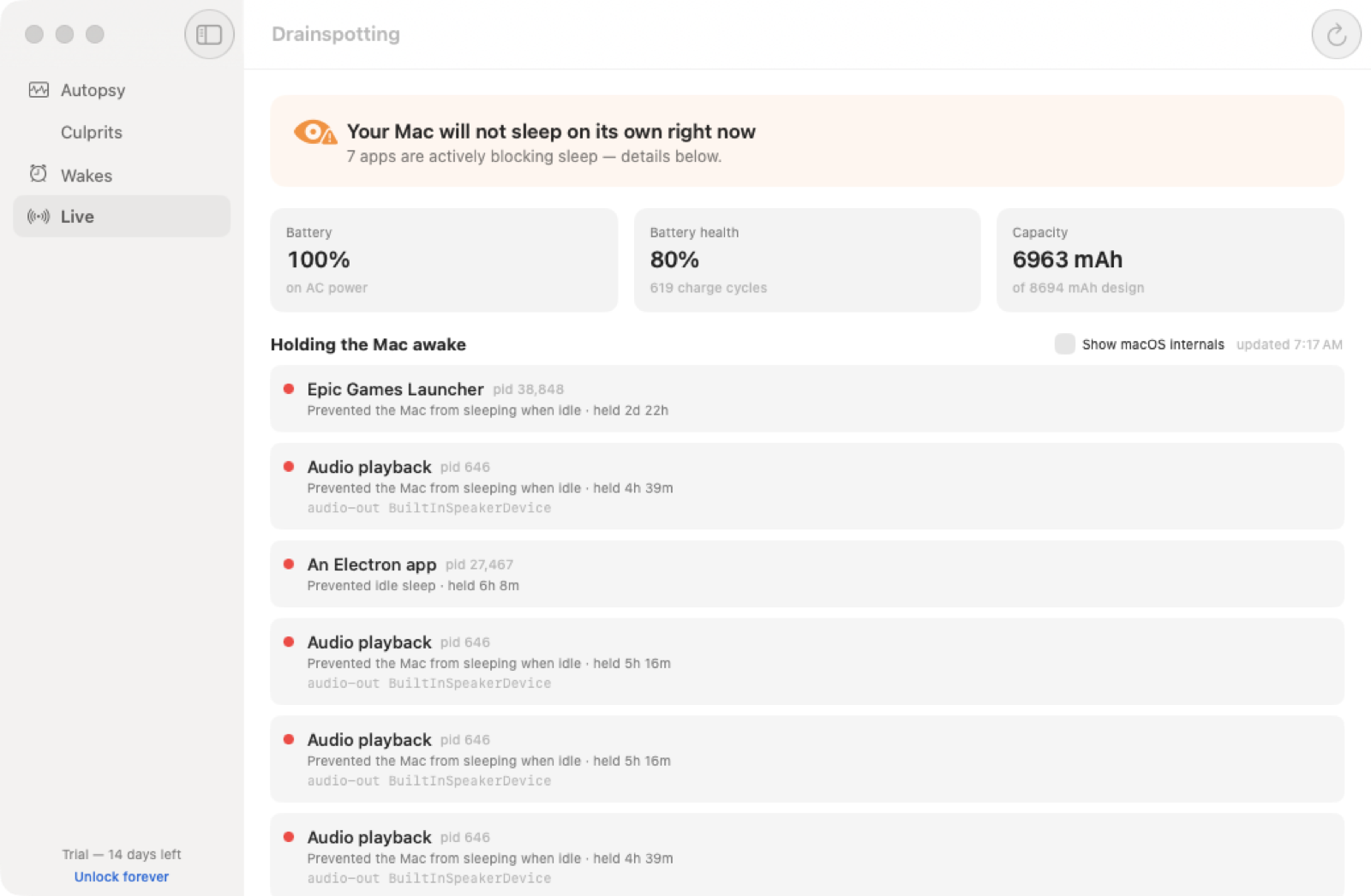
On the very first Mac Drainspotting ran on, it caught Epic Games Launcher holding the machine awake for 2 days 22 hours with a "Running dedicated server" assertion.
Wakes
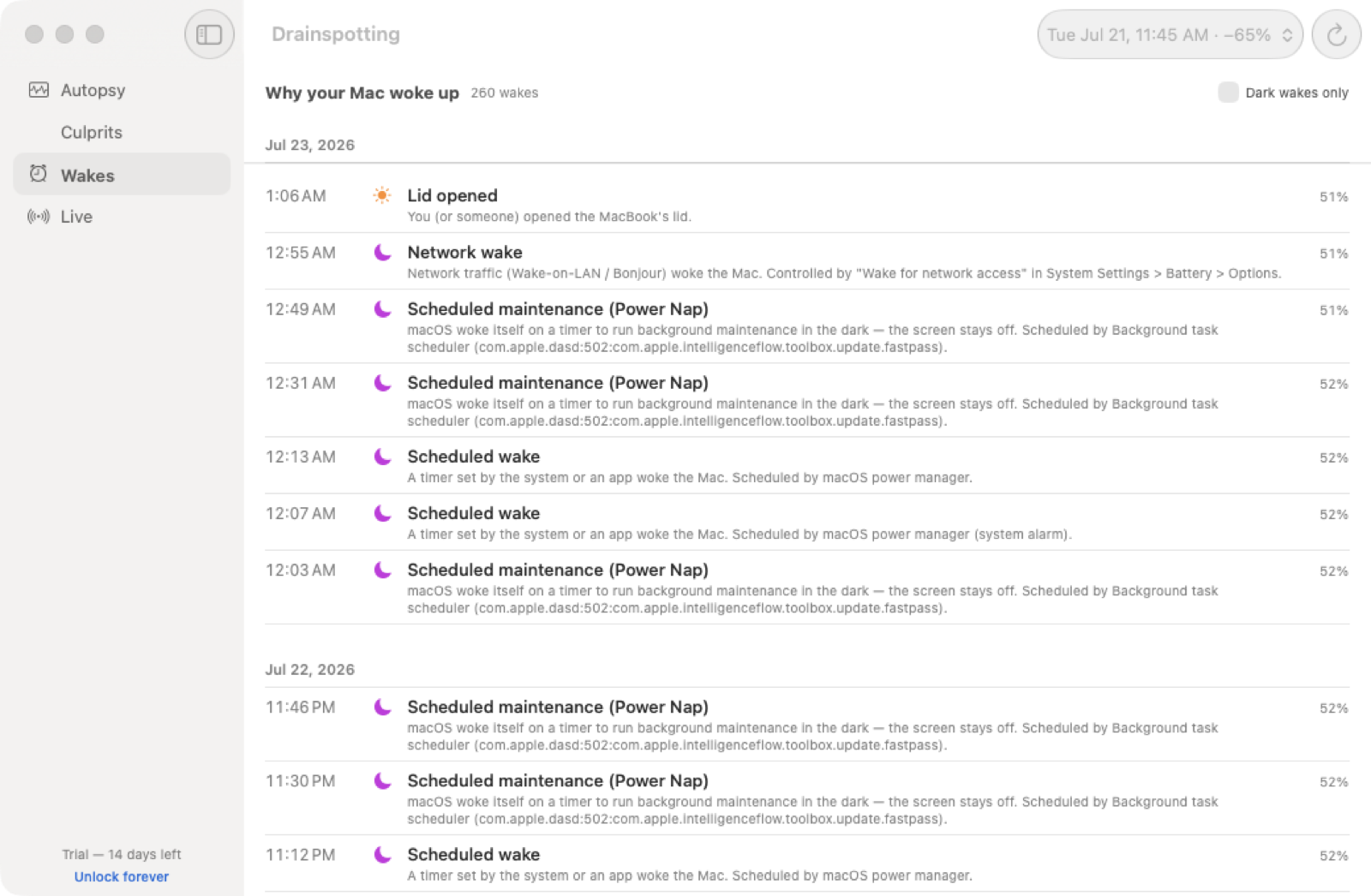
Decode every 3 AM wake-up
Lid? Power Nap? Network packet? Scheduled maintenance? Every wake is decoded and attributed — including which daemon scheduled it and why ("DHCP lease renewal", "backup schedule"). Turn the right things off with confidence.
Live
What's blocking sleep right now
A live verdict, updated every 10 seconds: "Your Mac will not sleep on its own right now — 7 apps are blocking." Close the lid with confidence, or catch the squatter red-handed first. Plus battery health and cycle count, no third-party mystery numbers.
Every Mac battery app does one job. Here's Drainspotting's.
We're not the best gauge, the best sleep-blocker, or the best charge-limiter — those apps already do that job well. We're the only one that explains why your battery actually drained.
Feature
Drainspotting
Sleep Aid
iStat Menus
coconutBattery
AlDente Pro
Explains why your battery drained (per-charge autopsy)
✓
–
–
–
–
Names the real app behind a vague system process
✓
–
–
–
–
Decodes every wake (lid / network / Power Nap / scheduled)
✓
–
–
–
–
Live "what's blocking sleep now" + one-click Quit
✓
–
–
–
–
Battery health & cycle count
✓
–
✓
✓
✓
Charge limiting (cap max charge %)
Planned
–
–
–
✓
Pricing
$14 one-time
one-time
one-time
one-time
subscription
✓ does this– doesn't (different focus, not a knock)Planned on the roadmap, not shipped
Based on each app's own advertised feature set as of July 2026. AlDente Pro's charge-limiting ("Sailing Mode") is a genuinely good, different feature — we'd rather point you to it today than pretend Drainspotting does something it doesn't.
Terminal person? drainspot is free.
The same analysis engine, open source (MIT), in your terminal. Pipe --json into scripts, dashboards, or your standup excuses.
Top culprits:
1. ●Audio playback prevented sleep 1h 19m fix: Pause playback or quit the app before you step away.
2. ●Spotlight indexing ran a background task 35m
🔒 Private by construction
Drainspotting reads Apple's own logs with Apple's own tools (pmset, ioreg) — read-only, no root, no kernel extensions, no helpers.
No data sharing — completely private
No account, no sign-in
Works fully offline
Open-source analysis engine you can audit
Own it. Don't rent it.
$14$19on sale
One purchase, yours forever. No subscription, because your battery isn't a service.
How is this different from Activity Monitor or the Battery settings?
Those show you now (CPU, energy impact) or a coarse usage chart. Neither explains the past: which app held your Mac awake at 2 AM, why it woke 260 times, or where the percent actually went between unplugging and this morning. Drainspotting reconstructs the timeline and names names.
How is this different from Sleep Aid, iStat Menus, or coconutBattery?
Great tools, different jobs. iStat Menus and coconutBattery are gauges — live stats and battery health. Sleep Aid focuses on preventing unwanted wakes. Drainspotting is the autopsy: per-charge drain attribution ("awake cost you 43%, DarkWake 18%"), causal culprit ranking, and plain-English explanations with fixes.
Does it need root or a kernel extension?
No. It runs the same read-only commands you could type yourself (pmset -g log, pmset -g assertions, ioreg) and parses the output. Nothing is installed system-wide, and uninstalling is dragging the app to the Trash.
Will it work on a desktop Mac?
Yes — there's no battery to autopsy, but the Culprits, Wakes, and Live views still explain sleep-blocking and wake behavior (useful for "why is my Studio's fan on at 4 AM").
What macOS versions are supported?
macOS 14 Sonoma and later, Apple Silicon and Intel, tested through the current release. The log format it parses has been stable across many macOS generations.
What data leaves my Mac?
Nothing. The only network request the app can ever make is the one-time license-key verification when you type a key in — and the trial makes none at all. The CLI is fully offline.